
Use these verified steps to pay your Karachi/Sindh traffic e-challan with mobile wallets (JazzCash, Easypaisa), internet banking/ATM (1BILL), or at a bank branch. After payment, confirm status and download your receipt. If a challan doesn’t appear or doesn’t update, see E-Challan Not Showing Online and Download/Print Duplicate Slip.
Quick facts
- ???? Wallets typically list Government/Traffic payments; some routes use Pakistan’s 1LINK “1BILL” rails used by Sindh services and banks.
- ???? Karachi Traffic fines can be managed online (incl. via app); wallets/banks commonly support traffic payments. Sources: wallet/bank pages and recent Karachi guides.
- ???? Always save your digital receipt and verify the challan shows “Paid.”
English: Step-by-Step Payment Methods
Method A – JazzCash (Mobile Wallet) ????
- Open JazzCash and log in.
- Go to Payments → Government Payments or Traffic Challan (menu labels may vary).
- Select the relevant category (e.g., Traffic/E-Challan).
- Enter your Challan No / PSID or required Vehicle No.
- Review challan details (amount, plate, agency). ✅
- Confirm and pay with your wallet MPIN.
- Save the receipt/screenshot. Then confirm status on the portal or app (see “After payment”).
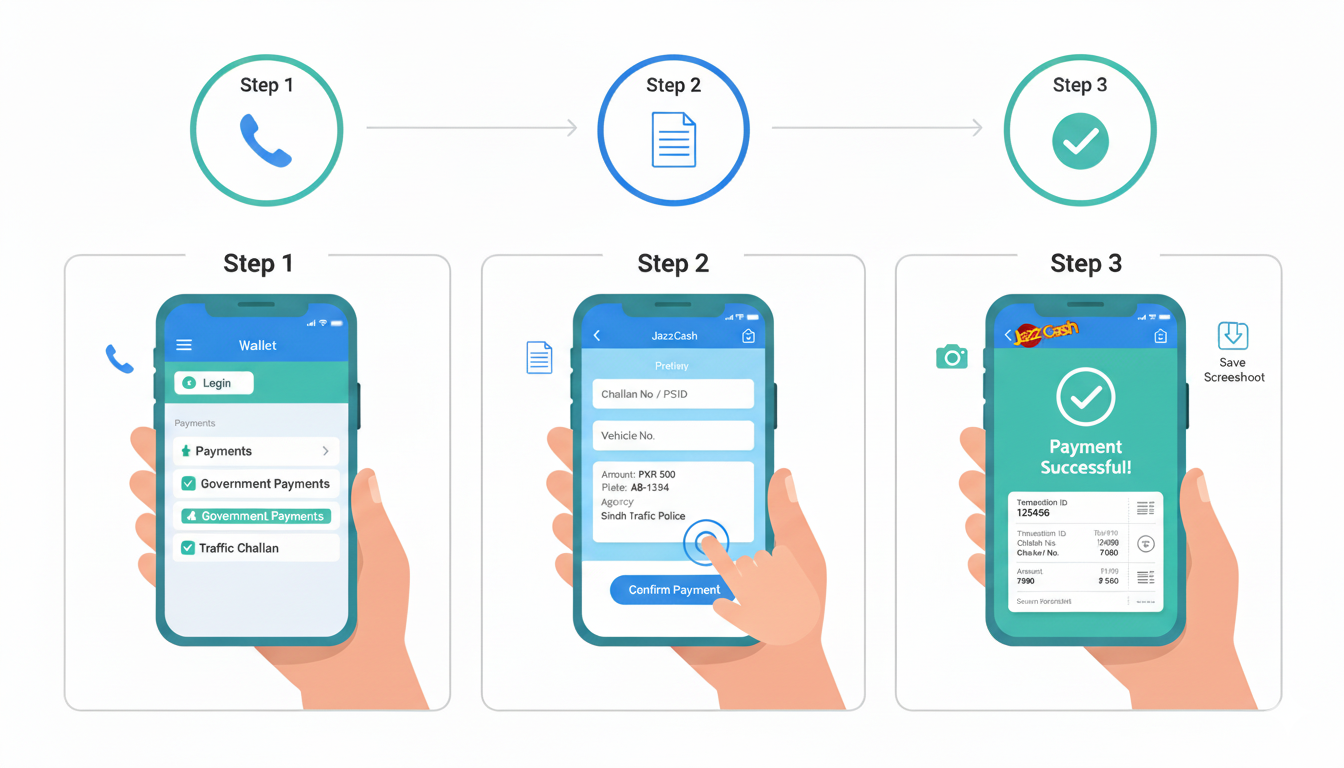
Source signal: JazzCash lists government and challan payments; they’ve promoted paying Karachi traffic fines via app. Availability and wording can change by product updates.
Method B – Easypaisa (Mobile Wallet) ????
- Open Easypaisa and log in.
- Go to Payments → Government or Traffic Challan.
- Choose the traffic/e-challan option if listed.
- Enter Challan No / PSID (or Vehicle No if the flow supports it).
- Verify challan details and pay.
- Save the receipt. Verify status on the portal or app.
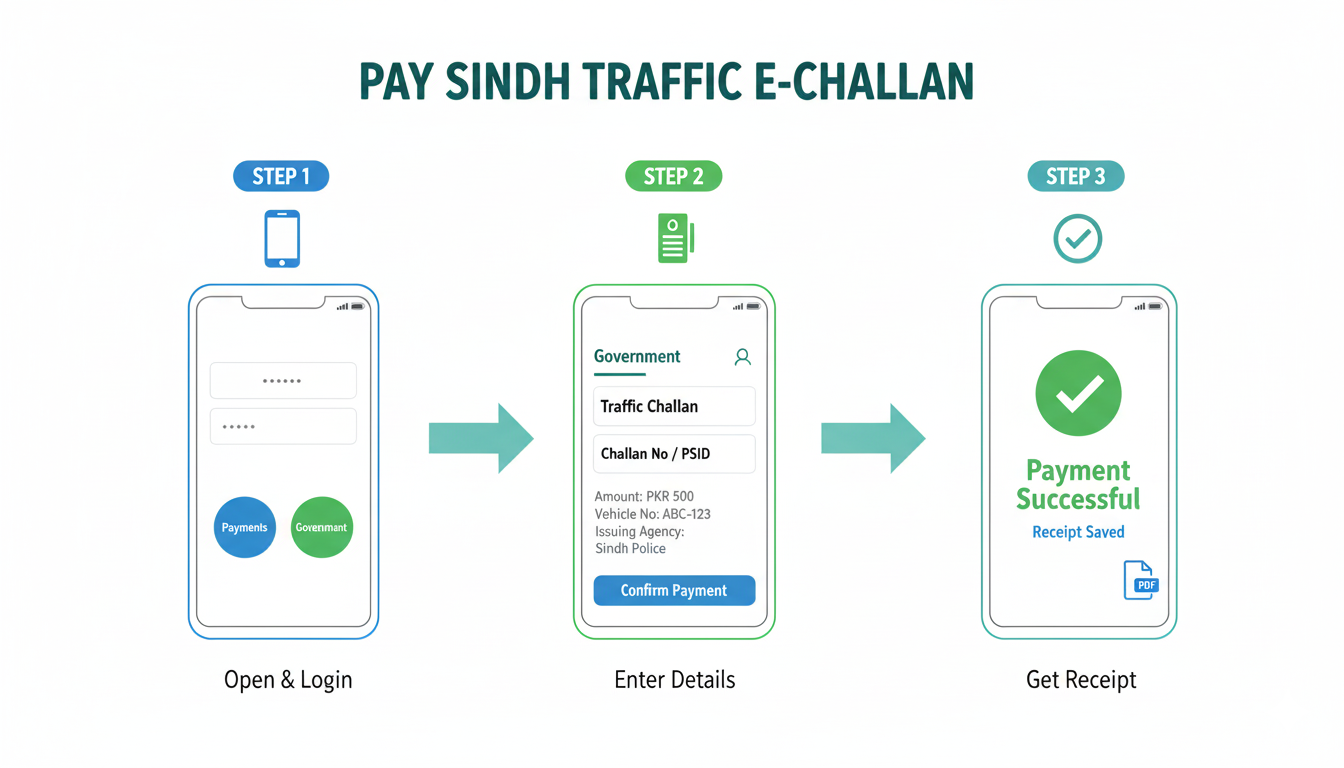
Note: Wallet menus vary by version/partner integration. If the direct category is missing, use Method C (bank app/ATM via 1BILL). Multiple Sindh services (e.g., DLS Online) use 1BILL with Easypaisa/JazzCash and banks, showing ecosystem support.
Method C – Internet Banking or ATM (1BILL) ????
- Open your bank mobile app or visit an ATM.
- Choose Bill Payments → 1BILL (or Invoice/Voucher Payment).
- Enter your Challan No / PSID.
- Confirm challan details and pay.
- Save the bank receipt. Verify on the official portal/app.
Evidence: Sindh Excise portal documents the 1BILL flow in ATM/app contexts (the same rails many gov payments use).
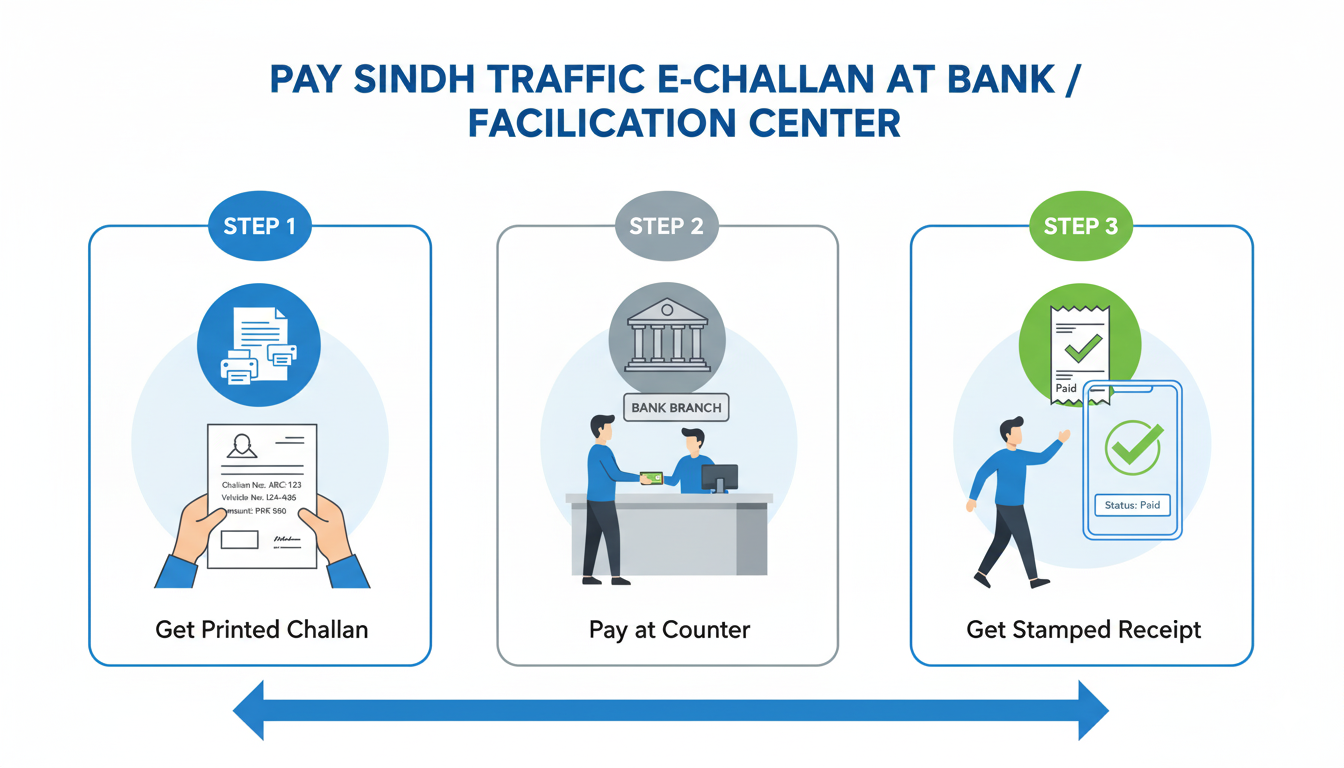
Method D – Bank Branch / Traffic Facilitation Center ????
- Print or note your challan.
- Go to a designated branch/facilitation counter.
- Pay at the counter and collect the stamped receipt.
- Later, confirm status on the portal/app.
Several Karachi/Sindh guides note payments can be made at bank branches in addition to wallets and e-banking.
After payment – Verify & Download Receipt ✅
- Re-check your challan on the official portal/app; status should switch to Paid (may take minutes to a few hours).
- If status is still pending, wait, then recheck. Keep your transaction ID safe. If needed, contact wallet/bank support.
- For a hard copy, see Download/Print Duplicate Slip.
Availability notes: Wallet menus and category names can change; some cities show a direct “Traffic Challan” tile, others use 1BILL (enter PSID/Challan No). Karachi’s citizen app also supports viewing/paying fines. See E-Challan Mobile App and Karachi E-Challan System.
اردو: مرحلہ وار ادائیگی کے طریقے
طریقہ A – جاز کیش (موبائل والیٹ) ????
- جاز کیش ایپ کھولیں اور لاگ ان کریں۔
- می뉴 میں Payments → Government Payments یا Traffic Challan پر جائیں (اندراجات ایپ کے ورژن کے حساب سے مختلف ہو سکتے ہیں)۔
- ٹریفک/ای-چالان کیٹگری منتخب کریں۔
- چالان نمبر / PSID یا ضرورت ہو تو گاڑی نمبر درج کریں۔
- تفصیلات چیک کریں (رقم، نمبر پلیٹ، ادارہ) اور ادائیگی کی تصدیق کریں۔
- رسید/اسکرین شاٹ محفوظ کریں اور بعد میں پورٹل یا ایپ پر اسٹیٹس چیک کریں۔
طریقہ B – ایزی پیسہ (موبائل والیٹ) ????
- ایزی پیسہ ایپ کھولیں اور لاگ ان کریں۔
- Payments → Government یا Traffic Challan منتخب کریں۔
- چالان نمبر/PSID (یا اگر آپشن ہو تو گاڑی نمبر) درج کریں۔
- تفصیلات دیکھ کر ادائیگی کریں اور رسید محفوظ کریں۔
اگر کیٹگری نظر نہ آئے تو بینک ایپ/اے ٹی ایم (1BILL) طریقہ استعمال کریں۔
طریقہ C – انٹرنیٹ بینکنگ / اے ٹی ایم (1BILL) ????
- بینک ایپ کھولیں یا اے ٹی ایم پر جائیں۔
- Bill Payments → 1BILL (یا Invoice/Voucher Payment) منتخب کریں۔
- چالان نمبر / PSID درج کریں، تفصیلات کی تصدیق کریں اور ادائیگی کریں۔
- رسید محفوظ کریں اور پورٹل/ایپ پر اسٹیٹس چیک کریں۔
طریقہ D – بینک برانچ / ٹریفک فیسلٹیشن سینٹر ????
- چالان پرنٹ کریں یا نمبر نوٹ کریں۔
- نامزد برانچ/کاؤنٹر پر ادائیگی کریں اور مہر لگی رسید لیں۔
- بعد میں پورٹل/ایپ میں Paid اسٹیٹس کی تصدیق کریں۔
ادائیگی کے بعد – تصدیق اور رسید ✅
- پورٹل/ایپ میں چیک کریں کہ اسٹیٹس Paid ہو گیا ہے (کبھی کبھار کچھ وقت لگتا ہے)۔
- اگر اپڈیٹ نہ ہو تو کچھ دیر بعد دوبارہ چیک کریں اور ٹرانزیکشن آئی ڈی سنبھال کر رکھیں۔
- پرنٹ/پی ڈی ایف کیلئے ڈپلیکیٹ سلپ ڈاؤن لوڈ کریں۔
Troubleshooting & Safety
- ❓ Challan not found? Try CNIC search, confirm vehicle registration against your CNIC, or wait for sync. Guide: E-Challan Not Showing Online.
- ???? Need a print? Use Download/Print Duplicate Slip.
- ⚠️ Beware of scam links/APKs. Only use official portals/apps; ignore WhatsApp payment links. Recent advisories warn of fake “e-challan” apps/messages.
Related guides
- How to Check E-Challan (Sindh)
- Verify E-Challan Using CNIC
- Karachi E-Challan System
- E-Challan Mobile App (Karachi)
- Appeal/Dispute a Wrong E-Challan
- Traffic Violation Fines in Sindh
FAQs
How fast does “Paid” status appear?
Usually within minutes; in some cases up to 24 hours. Keep the transaction ID.
Do wallets charge a fee?
Wallet/bank fees and menus can change. If a fee appears, compare with bank app/ATM or branch. (Some guides state zero charges; confirm in-app before paying.)
Can I pay only with a vehicle number?
Flows often require a challan number/PSID. If the wallet has a direct “Traffic Challan” tile, vehicle number may be supported. Otherwise use 1BILL with PSID in bank apps/ATMs.
Is there an official Karachi app?
Yes. Karachi Traffic Police citizen apps support viewing/handling fines. See our app guide.
Disclaimer: Menu names and partners change. We are an informational site and do not process payments.